apt-get install debian-wizard

Insider infos, master your Debian/Ubuntu distribution

  • About
    • About this blog
    • About me
    • My free software history
  • Support my work
  • Get the newsletter
  • More stuff
    • Support Debian Contributors
    • Other sites
      • My company
      • French Blog about Free Software
      • Personal Website (French)
  • Mastering Debian
  • Contributing 101
  • Packaging Tutorials
You are here: Home / Archives for Debian

How to triage bugs in the Debian bug tracking system

September 16, 2011 by Raphaël Hertzog

Triaging bugs is one of the easiest way to start contributing to Debian. I’ll teach you the basics in this article.

1. Prerequisites

All interactions with the Debian Bug Tracking System (BTS) happen through email so you need to have an email account with an address that you’re willing to make public.

All the mail that you send to the BTS will be archived and publicly available through its web-interface. This also means that you should have some spam filters in place because it will inevitably be harvested by spammers. 🙁

To ensure that this email address is consistently used by the various tools that we’re going to use, it’s a good idea to put this email address in the DEBEMAIL environment variable. You can also specify your full name in DEBFULLNAME (in case you don’t want to use the name associated with your Unix account). You usually do this by modifying ~/.bashrc (if you use bash as login shell):

export DEBEMAIL="hertzog@debian.org"
export DEBFULLNAME="Raphaël Hertzog"

You should also install the devscripts package, it provides the bts command that we’re going to use.

2. Find a package or a team with too many bugs

You can literally pick any popular software that’s in Debian, they almost always get more bug reports than the maintainers can handle. Instead of picking a package, you can also select a packaging team and concentrate your efforts on the set of packages managed by the team.

In any case, it’s important to receive the bug traffic for the packages that you’re going to work on. If you went for a specific package, you should subscribe to the package via the Package Tracking System (there’s a subscribe box on the bottom left corner once you selected the source package of interest). If you decided to help a team, there’s usually a dedicated mailing list receiving all bug traffic.

You can browse a list of packages with the most bugs if you have troubles finding a package to work on.

A stack of bug reports to triage

3. Triage bugs!

Bug triaging is all about making sure that bugs are correctly classified so that when a developer looks at the bug list, he can quickly find bugs with all the information required to be able to fix them!

3.1 Adding information to bug

Adding supplementary information is easily done just by sending a mail to XXXX@bugs.debian.org (replace XXXX with the bug number).

But often you want to reply to a message in the bug history, in that case “bts --mbox show XXXX” is for you. It will grab the corresponding mailbox and open a mailer (mutt by default) on it. Now you can directly reply in your favorite mailer.

3.2 Classifying bugs

The Debian BTS uses tags (click the link and read the doc!) to classify bugs. “bts tag XXXX + foo” will add the foo tag (replace the + with a – to remove a tag). If you want to explain why you’re adding a tag, you should instead reply in the bug log as explained above, put control@bugs.debian.org in Bcc (Blind Carbon Copy) and start the body of your message with your tag command:

tag XXXX + foo
thanks

But what tag should you add? When a bug is submitted, you should try to reproduce the bug. If you can reproduce it, then tag the bug “confirmed” (example in #641710). If you can’t, you should request more information (ex: a sample document triggering the bug, a configuration file, the output of some relevant command, etc.) until you can reproduce it or conclude that it was a user mistake. When you request supplementary information due to this, you should tag the bug “unreproducible moreinfo” (example in #526774). “moreinfo” should be later dropped when the requested information are provided, and “unreproducible” should be dropped if those information were enough to actually help reproduce the bug (example in #526774).

During that initial evaluation, it’s also worth differentiating packaging bugs (which are specific to Debian) from upstream bugs (which are relevant also for non-Debian users). The latter should be tagged “upstream” (and forwarded upstream if the bug is reproducible or contains enough information for the upstream developers, example in #635112).

If you saw a (viable) patch in the bug log, the bug should be tagged “patch”. This is usually done by the patch submitter but sometimes it’s forgotten (example in #632460). Take care though to not reinstate the patch tag if it was initially set but then dropped by the package maintainer after a review of the patch.

If the title of the bug report is not descriptive enough, you can change it with a “retitle XXXX new-title” command (example in #170850).

You can also change the severity of the bug report depending on the impact of the problem (with a command “severity XXXX new-severity”, what a surprise!). Request for new features are “wishlist”, most documentation problems are “minor”. On the other side of the scale, you can use “important” for bugs that are very annoying but that should not block a release. “serious”, “grave” and “critical” are used for release critical bugs, check the official definitions of the severities (examples in 502738 or #506498).

3.3 Closing non-bugs and bugs that are already fixed

If your analysis of the bug report is that it’s not really a bug but a user mistake, then you should close it by sending a mail to XXXX-done@bugs.debian.org with some explanations of the user’s mistake so that he can get past his problem (example in #592853).

If the problem was a real bug, but one that is apparently already fixed, you should try to quickly find the version that fixed the bug. If you can’t find it in the changelog (there’s a link to it in the PTS, or you can use /usr/share/doc/package/changelog.Debian.gz), you’ll make the safe assumption that the upstream version you’re currently using is the first one where this is fixed. Then you send a mail to XXXX-done@bugs.debian.org but you start your mail with “Version: version-that-fixed-the-bug” and continue with a small explanation of why you believe the bug to be fixed by this version (example in #122948).

3.4 Reassigning misfiled bug reports

Bug reports are not always filed against the proper package. Users file bugs against applications where they experience the bugs, but the real bug might be in an underlying library or application.

When that happens, you should use the “reassign XXXX correct-package version” command to get it filed against the correct package. The version parameter is optional but should be provided if possible, it should be the oldest version that we know to have the problem (example in #626232).

3.5 Forwarding bugs

Forwarding bugs means opening bug reports in the upstream bug tracker for issues that have been reported in Debian but that applies to the upstream (unmodified) source code. Be sure to include all the relevant information and a link to the corresponding Debian bug.

Depending on the upstream bug tracker, you might have to open an account to be able to file new bug reports.

On the Debian side, you must record that a bug has been forwarded with “bts forwarded XXXX upstream-bug-url”. upstream-bug-url is the URL corresponding to the upstream bug report you created (ex: http://projects.ciarang.com/p/feed2omb/issues/21/ recorded in #609345″).

If the upstream authors fix the bug you reported, you can tag the Debian bug with “fixed-upstream” so that it’s easier to find bugs to close when the next upstream release comes out (example in #637275).

3.6 Updating version information

The Debian BTS uses “version tracking” to know which package versions are affected by a given bug. It’s particularly important to have correct version information for release critical bugs since it might affect the migration of packages to testing.

You can learn more on this topic here: http://wiki.debian.org/HowtoUseBTS.

4. More advice

Colin Watson wrote a constructive rant explaining some mistakes that bug triagers are often doing. While it refers mainly to Ubuntu’s launchpad, the advice apply equally as well to Debian. Check it out to become a better bug triager!

Note that you can refer to this article with this shorter URL: https://raphaelhertzog.com/go/bugtriaging/

Do you want to read more tutorials like this one? Click here to subscribe to my free newsletter, you can opt to receive future articles by email.

Understand dpkg and don’t get stuck with a maintainer script failure

September 13, 2011 by Raphaël Hertzog

Continuing my series of articles on dpkg’s errors, this time I’ll cover a pretty common one which has several variations:

Setting up acpid (1:2.0.12-1) ...
rm: cannot remove `/etc/rc1.d/K20acpid': No such file or directory
dpkg: error processing acpid (--configure):
 subprocess installed post-installation script returned error exit status 1
Errors were encountered while processing:
 acpid

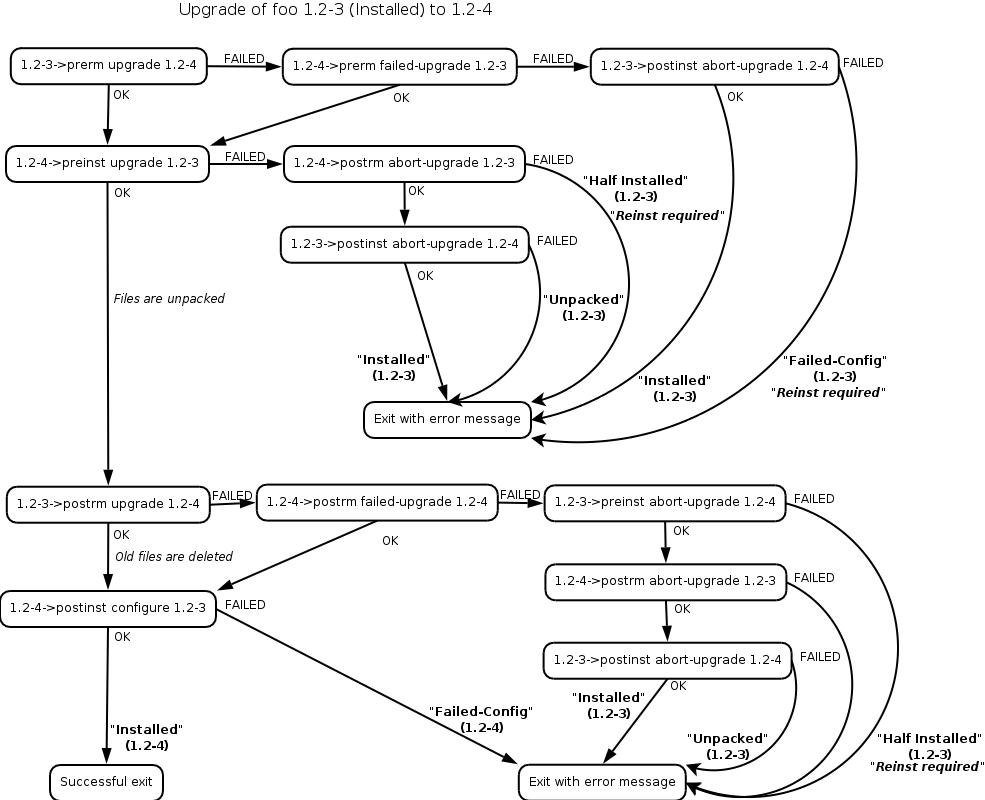
Even if dpkg is failing and outputting the error message, the real problem is not in dpkg but in the installed package (acpid in the example above). As we already learned, a package contains not only files but also “maintainer scripts” that are executed at various points of the installation process (see some useful graphics to understand how they are called, thanks to Margarita Manterola).

Maintainer scripts in a package upgrade

In the introductory example it was acpid’s “post-installation script” that failed, and dpkg is only forwarding that failure back to the caller. The maintainer scripts are stored in /var/lib/dpkg/info/. You can thus inspect them and even modify them if you hit a bug and want to work around it (do this only if you understand what you do!).

One common modification is to add “set -x” at the start of the script and to retry the failing operation. That way you can see what’s executed exactly. Here’s what the output could look like after the addition of “set -x” to /var/lib/dpkg/info/acpid.postinst:

$ sudo dpkg --configure acpid
Setting up acpid (1:2.0.12-1) ...
+ dpkg --compare-versions 1:2.0.11-1 lt-nl 1.0.10-3
+ dpkg --compare-versions 1:2.0.11-1 lt-nl 1.0.6-16
+ dpkg --compare-versions 1:2.0.11-1 lt 1.0.6-6
+ rm /etc/rc1.d/K20acpid
rm: cannot remove `/etc/rc1.d/K20acpid': No such file or directory
dpkg: error processing acpid (--configure):
 subprocess installed post-installation script returned error exit status 1
Errors were encountered while processing:
 acpid

This output helps you locate the command that is actually failing. Here’s it’s relatively easy since we have an error message from “rm”. And the fix is trivial too, we replace “rm” with “rm -f” so that it doesn’t fail when the file doesn’t exist (this is a fake bug I made up for this article—I just added a failing rm call—but it’s inspired by real bugs I experienced).

Maintainer scripts are supposed to be idempotent: we should be able to execute them several times in a row without bad consequences. It happens from time to time that the maintainer gets this wrong… on the first try it works, so he uploads his package and we discover the problem only later once someone ended up executing the same code twice for some reason.

Follow me on Identi.ca, Twitter, Facebook and Google+. Or subscribe to this blog by RSS or by email.

My Debian activities in August 2011

September 4, 2011 by Raphaël Hertzog

This is my monthly summary of my Debian related activities. If you’re among the people who made a donation to support my work (91.44 €, thanks everybody!), then you can learn how I spent your money. Otherwise it’s just an interesting status update on my various projects.

Dpkg work

When I came back from Debconf, I merged my implementation of dpkg-source --commit (already presented last month). I continued some work on the hardening build flags but it’s currently stalled waiting on Kees Cook to provide the required documentation to integrate in dpkg-buildflags(1).

Following a discussion held during DebConf, Michael Prokop has been kind enough to setup a git-triggered auto-builder of dpkg (using Jenkins). You can now help us by testing the latest git version. Follow those instructions:

$ wget -O - http://jenkins.grml.org/debian/C525F56752D4A654.asc | sudo apt-key add -
$ sudo sponge /etc/apt/sources.list.d/dpkg-git <<END
deb http://jenkins.grml.org/debian dpkg main
END
$ sudo apt-get update && sudo apt-get upgrade

On the bug fixing side I took care of #640198 (minor man page update), #638291 (a fix to correctly handle hardlinks of conffiles), #637564 (the simplification logic of union dependencies was broken in some cases) and #631494 (interrupting dpkg-source while building a native source package left some temporary files around that should have been cleaned).

WordPress update

I released WordPress 3.2.1 in unstable (after having taken the time to test the updated package on my blog!) and fixed its RC bug (#625773). In the process I discovered a false positive in lintian (I reported it in 637473).

Gnome-shell-timer package

From time to time, I like to use the Pomodoro Technique. That’s why I was an user of timer-applet in GNOME 2. Now with the switch to GNOME 3, I lost this feature. But I recently discovered gnome-shell-timer, a GNOME Shell extension that provides the same features.

I created a Debian package of it and quickly filed some bugs while I was testing it (two usability issues and an encoding problem)

QA Work

During DebConf I met Giovanni Mascellani and he was interested to help the QA team. He started working on the backlog of bugs concerning the Package Tracking System (PTS) and submitted a bunch of patches. I reviewed them and merged them but since they were good, I quickly got lazy and got him added to the QA team so that he can commit his fixes alone. It also helps to build trust when you have had the opportunity to discuss face to face. 🙂

Vacation

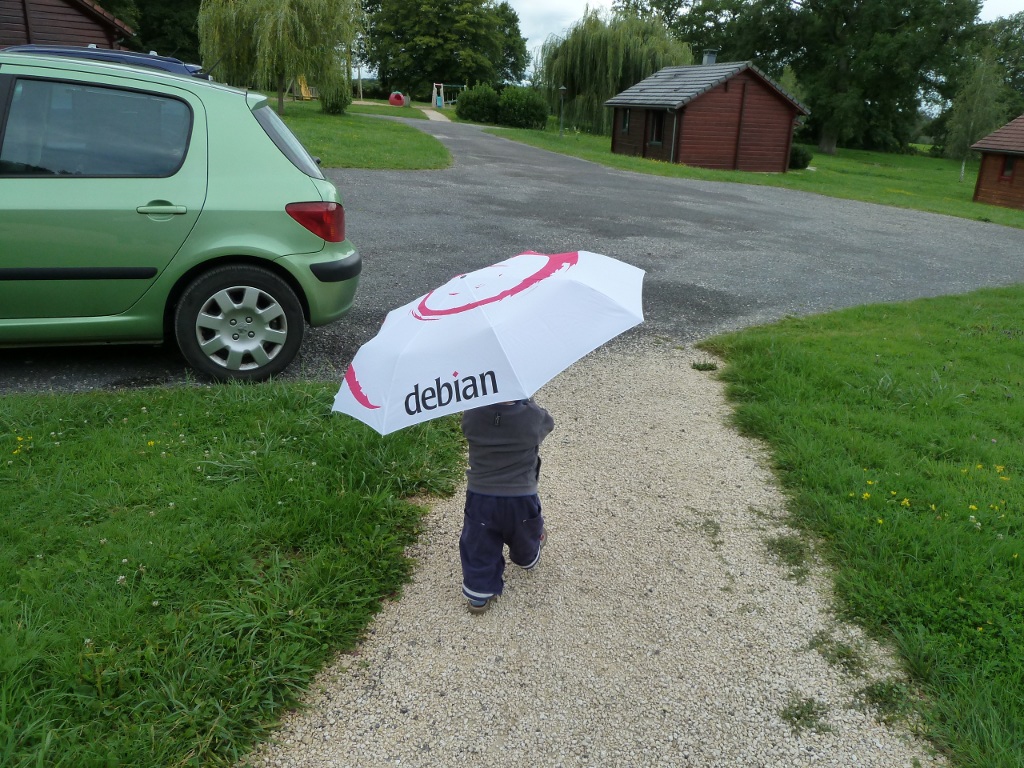
That’s not so much compared to usual but to my defense I also took 2 weeks of vacation with my family. But somehow even in vacation I can’t really forget Debian. Here’s my son:

Thanks

See you next month for a new summary of my activities.

People behind Debian: Peter Palfrader, Debian System Administrator

August 18, 2011 by Raphaël Hertzog

You might not know who Peter is because he’s not very visible on Debian mailing lists. He’s very active however and in particular on IRC. He was an admin of the OFTC IRC network at the time Debian switched from Freenode to OFTC. Nowadays he’s a member of the Debian System Administration team who runs all the debian.org servers.

If you went to a Debconf you probably met him since he’s always looking for new signatures of his GPG key. He owns the best connected key in the PGP web of trust. He also wrote caff a popular GPG key signing tool.

Raphael: Who are you?

Peter: I’m Peter Palfrader, also known as weasel. I’m in my early 30s, born and raised in Innsbruck, Austria and am now living and working in Salzburg, Austria. In my copious free time, other than help running Debian’s servers I also help maintaining the Tor project‘s infrastructure.

Away from the computer I enjoy reading fiction (mostly English language Science Fiction and Fantasy), playing board games and going to the movies. Weather permitting, I also occasionally do some cycling.

Raphael: How did you start contributing to Debian?

Peter: I installed my first Debian the week slink came out. That was Debian 2.1 for the youngsters, in early 1999. The one thing I immediately liked about slink was that Debian’s pppd supported RAS authentication which my university’s dial-up system required. No way I’d go back to SuSE 5.3 when I had working Internet with my Debian box. 🙂

During that year I started getting involved in the German language Debian channel on IRCnet which got me in contact with some DDs. Christian Kurz (<shorty>) was working on Debian QA at the time and he asked my help in writing a couple of scripts. Some of that work, debcheck, still produces parts of the qa.d.o website, tho the relevance of that nowadays is probably negligible.

While trying to learn more Perl earlier, I had written a program to produce syntax highlighted HTML for code snippets in various languages. I didn’t really know what I was doing but it kinda worked, and probably still does since I still get mail from users every now and then. I figured that it would be really nice if people could just get my software together with Debian. According to code2html‘s Debian changelog the initial release of the package was done on a weekday at 2:30 in the morning early in 2000, and if my memory serves me correctly, shorty uploaded it shortly afterwards.

I started packaging a couple of other piece of software and in the same year I sent my mail to the debian account managers to register my intent to become a DD. No new developers where being accepted at that time since the DAMs wanted to overhaul the entire process so I wasn’t surprised to not get any immediate reply. Of course what the silence also meant was that the mail had been lost, but I only learned of that later when I took all my courage to ask DAM about the status of application a couple months later. Once that was sorted out I was assigned an AM, did the usual dance, and got my account late in November 2000.

Raphael: Four years ago, the Debian System Administration team was a real bottleneck for the project and personal conflicts made it almost impossible to find solutions. You were eager to help and at some point you got dropped as a new member in that team. Can you share your story and how you managed the transition in the difficult climate at that time?

Peter: Ah, that was quite the surprise for an awful lot of people, me included.

Branden Robinson, who was our DPL for the 2005-2006 term, tried to get some new blood added to DSA who were at the time quite divided. He briefly talked to me on IRC some time in summer 2005, telling me I had come “recommended for a role on the sysadmin team”. In the course of these 15 minutes he outlined some of the issues he thought a new member of DSA would face and asked me if I thought I could help. My reply was cautiously positive, saying that I didn’t want to step on anybody’s toes but maybe I could be of some assistance.

And that was the first and last of it, until some fine November day two years later I got an email from Phil Hands saying “I’ve just added you to the “adm” group, and added you to the debian-admin@d.o alias.” and “welcome on board“. *blink* What!?

My teammates at the time were James Troup (elmo), Phil Hands (fil), Martin ‘Joey’ Schulze and Ryan Murray (neuro).

The old team, while apparently not on good terms with one another, was however still around to do heavy lifting when required. I still remember when on my first or second day on the team two disks failed in the raid5 of ftp-master.debian.org aka ries. Neuro did the reinstall once new disks had arrived at Brown University. I’m sure I’d have been way out of my league had this job fallen to me.

Fortunately my teammates were all willing and able to help me find whatever pieces of information existed that might help me learn how debian.org does its stuff. Unfortunately a lot of it only existed in various heads, or when lucky, in one of the huge mbox archives of the debian-admin alias or list. Anyway, soon I was able to get my hands dirty with upgrading from sarge to etch, which had been released about half a year earlier.

Raphael: I know the DSA team has accomplished a lot over the last few years. Can you share some interesting figures?

Peter: Indeed we have accomplished a lot. In my opinion the most important of these accomplishment is that we’re actually once again a team nowadays. A team where people talk to one another and where nobody should be a SPoF.

Since this year’s debconf we are six people in the admin team: Tollef Fog Heen (Mithrandir) and Faidon Liambotis (paravoid) joined the existing members: Luca Filipozzi, Stephen Gran, Martin Zobel-Helas, and myself. Growing a core team, especially one where membership comes with uid0 on all machines, is not easy and that’s why I’m very glad we managed to actually do this step.

I also think the infrastructure and our workflows have matured well over the last four years.

We now have essential monitoring as a matter of course: Nagios not only checks whether all daemons that should be running are in fact running, but it also monitors hardware health of disks, fans, etc. where possible. We are alerted of outstanding security updates that need to be installed and of changes made to our systems that weren’t then explicitly acked by one of us.

We have set up a centralized configuration system, puppet, for some of our configuration that is the same, or at least similar, on all our machines.

Most, if not all, pieces of software, scripts and helpers that we use on debian.org infrastructure is in publicly accessible git repositories.

We have good communication with other teams in Debian that need our support, like the ftp folks or the buildd people.

As for figures, I don’t think there’s anything spectacular. As of the time of our BoF at this year’s DebConf, we take care of approximately 135 systems, about 100 of them being real iron, the other virtual machines (KVM). They are hosted at over 30 different locations, tho we are trying to cut down on that number, but that’s a long and difficult process.

We don’t really collect a lot of other figures like web hits on www.debian.org or downloads from the ftp archive. The web team might do the former and the latter is pretty much impossible due to the distributed nature of our mirrors, as you well know.

Raphael: The DSA team has a policy of eating its own dog food, i.e. you’re trying to rely only on what’s available in Debian. How does that work out and what are the remaining gaps?

Peter: Mostly Debian, the OS, just meets our needs. Sure, the update frequency is a bit high, we probably wouldn’t mind a longer release cycle. But on the other hand most software is recent enough. And when it’s not, that’s easy to fix with backports. If they aren’t on backports.debian.org already, we’ll just put them there (or ask somebody else to prepare a backport for us) and so everybody else benefits from that work too.

Some things we need just don’t, and probably won’t, exist in Debian. These are mainly proprietary hardware health checks like HP’s tools for their servers, or various vendors’ programs to query their raid controller. HP actually makes packages for their stuff which is very nice, but other things we just put into /usr/local, or if we really need it on a number of machines, package ourselves.

The push to cripple our installers and kernels by removing firmware was quite annoying, since it made installing from the official media next to impossible in some cases. Support for working around these limitations has improved with squeeze so that’s probably ok now.

One of the other problems is that especially on embedded platforms most of the buildd work happens on some variation of development boards, usually due to increased memory and hard disk requirements than the intended market audience. This often implies that the kernel shipped with Debian won’t be usable on our own debian.org machines. This makes keeping up with security and other kernel fixes way more error prone and time intensive. We keep annoying the right people in Debian to add kernel flavors that actually boot on our machines, and things are getting better, so maybe in the future this will no longer be a problem.

Raphael: If you could spend all your time on Debian, what would you work on?

Peter: One of the things that I think is a bit annoying for admins that maintain machines all over the globe is mirror selection. I shouldn’t have to care where my packages come from, apt-get should just fetch them from a mirror, any mirror, that is close by, fast and recent. I don’t need to know which one it was.

We have deployed geodns for security.debian.org a while ago, and it seems to work quite well for the coarse granularity we desired for that setup, but geodns is an ugly hack (I think it is a layer violation), it might not scale to hundreds or thousands of mirrors, and it doesn’t play well with DNSSEC.

What I’d really like to see is Debian support apt’s mirror method that — I think (and I apologize if I’m wronging somebody) — Michael Vogt implemented recently. The basic idea is that you simply add deb mirror://mirror.debian.org/ or something like that to your sources.list, and apt goes and asks that server for a list of mirrors it should use right now.

The client code exists, but I don’t know how well tested it is. What is missing is the server part. One that gives clients a mirror, or list of mirrors, that are close to them, current, and carry their architecture.

It’s probably not a huge amount of work, but at the same time it’s also not entirely trivial. If I had more time on my hands this is something that I’d try to do. Hopefully somebody will pick it up.

Raphael: What motivates you to continue to contribute year after year?

Peter: It’s fun, mostly. Sure, there are things that need to be done regularly that are boring or become so after a while, but as a sysadmin you tend to do things once or twice and then seek to automate it.

DSA’s users, i.e. DDs, constantly want to play with new services or approaches to make Debian better and often they need our support or help in their endeavors. So that’s a constant flow of interesting challenges.

Another reason is that Debian is simply where some of my friends are. Working on Debian with them is interacting with friends.

I not only use Debian at debian.org. I use it at work, I use it on my own machines, on the servers of the Tor project. When I was with OFTC Debian is what we put on our machines. Being a part of Debian is one way to ensure what Debian releases is actually usable to me, professionally and with other projects.

Raphael: Is there someone in Debian that you admire for their contributions?

Peter: That’s a hard one. There are certainly people who I respect greatly for their technical or other contributions to Debian, but I don’t want to single anybody out in particular. I think we all, everyone who ever contributed to Debian with code, support or a bug report, can be very proud of what we are producing — one of the best operating systems out there.


Thank you to Peter for the time spent answering my questions. I hope you enjoyed reading his answers as I did. Subscribe to my newsletter to get my monthly summary of the Debian/Ubuntu news and to not miss further interviews. You can also follow along on Identi.ca, Twitter and Facebook.
  • « Previous Page
  • 1
  • …
  • 55
  • 56
  • 57
  • 58
  • 59
  • …
  • 95
  • Next Page »

Get the Debian Handbook

Available as paperback and as ebook.
Book cover

Email newsletter

Get updates and exclusive content by email, join the Debian Supporters Guild:

Follow me

  • Email
  • Facebook
  • GitHub
  • RSS
  • Twitter

Discover my French books

Planets

  • Planet Debian

Archives

I write software, books and documentation. I'm a Debian developer since 1998 and run my own company. I want to share my passion and knowledge of the Debian ecosystem. Read More…

Tags

3.0 (quilt) Activity summary APT aptitude Blog Book Cleanup conffile Contributing CUT d-i Debconf Debian Debian France Debian Handbook Debian Live Distro Tracker dpkg dpkg-source Flattr Flattr FOSS Freexian Funding Git GNOME GSOC HOWTO Interview LTS Me Multiarch nautilus-dropbox News Packaging pkg-security Programming PTS publican python-django Reference release rolling synaptic Ubuntu WordPress

Recent Posts

  • How to choose your SSH agent with Wayland and systemd
  • Freexian is looking to expand its team with more Debian contributors
  • Freexian’s report about Debian Long Term Support, July 2022
  • Freexian’s report about Debian Long Term Support, June 2022
  • Freexian’s report about Debian Long Term Support, May 2022

Copyright © 2005-2021 Raphaël Hertzog